
Blog/Email Marketing
Klaviyo vs Mailchimp for Shopify: Why Serious DTC Brands Migrate
 By Rafi Helmi (Rahel) Rabani9 October 20267 min read
Mailchimp works fine until your Shopify store crosses a certain revenue point, then it quietly becomes the thing holding your retention channel back.
The klaviyo vs mailchimp shopify debate isn’t about which platform is “better” in the abstract, it’s about which one still fits once your flows start carrying real revenue.
Serious DTC brands don’t migrate because Mailchimp is bad, they migrate because they outgrow what it was built for.
What’s the Actual Difference in the Klaviyo vs Mailchimp Shopify Integration?
Klaviyo was built around ecommerce event data first, Mailchimp was built around general email marketing and added ecommerce features later. Klaviyo captures granular, product-level order events out of the box,
Mailchimp syncs broader order and customer data that’s enough for basic automation but thinner for advanced segmentation.
Part of that gap has a specific history. Mailchimp’s native Shopify app was pulled from the Shopify marketplace entirely in March 2019, after the two companies disputed over data sharing and competitive overlap [1].
Mailchimp rebuilt its integration years later, but Klaviyo spent that window building automation around live Shopify event data, leaving Mailchimp to catch up from a standing start.
Any honest comparison has to start there, not with feature checklists. Neither platform is incapable, the gap is in how much Shopify-specific behavior you can build around without custom workarounds.
Does Mailchimp’s Shopify App Really Rate Higher Than Klaviyo’s?
On the Shopify App Store itself, yes, slightly, Mailchimp’s main app sits at 4.8 out of 5 while Klaviyo’s sits at 4.7 [2]. Most comparison articles skip this, assuming the more ecommerce-focused platform automatically wins on app store sentiment too.
App store rating measures installation experience, not whether the platform can support the specific flows a growing DTC brand needs. A slightly higher star rating doesn’t offset a shallower integration once your automation needs get past a single abandoned cart email.
Which Platform Handles SMS Better for a Shopify Store?
Klaviyo runs SMS inside the same automated flows as email, while Mailchimp sells SMS as a separate add-on. Klaviyo describes multi-channel flows that coordinate SMS, email, and push messages with a unified customer view [3], whereas Mailchimp’s SMS requires an Essentials plan or higher, purchased credits, and a separate approval and registration for each sending number and country [4].
Mailchimp isn’t weaker on reach, though. It supports SMS in the US, Canada, the UK, Belgium, Australia, and 32 other countries through branded sender IDs [4], which is wider than the 23 countries Klaviyo lists [3].
For a store selling into many markets, that’s a real point in Mailchimp’s favor. The difference is mostly operational, Klaviyo treats SMS as one more step inside a flow, Mailchimp treats it as a separate program you apply for and fund with credits. Here is how the two compare side by side.
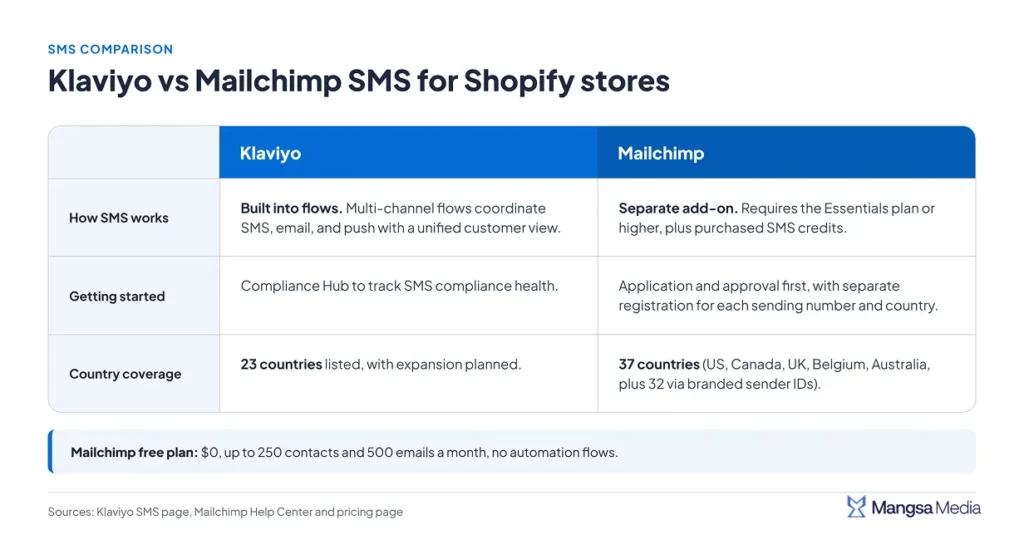
The right fit depends on where you sell and how much you want SMS tied into your flows.
Why Do Serious DTC Brands Migrate From Mailchimp to Klaviyo?
Because the flows they actually need outgrow what Mailchimp’s automation was designed to handle, multi-step abandoned cart logic, browse abandonment, and segmentation that reacts to live Shopify data instead of a synced snapshot.
One agency case study tracked a cycling and activewear brand’s year-over-year email revenue after a mailchimp to klaviyo migration, the jump was 4.8 times higher, a 940% increase in revenue attributed to email [5].
The brand’s old Mailchimp setup had no abandoned cart reminders, birthday automations, or product review requests, gaps that are standard Klaviyo flow templates from day one.
Related reading: Klaviyo Flows vs Campaigns Revenue Split
When Does Migrating to Klaviyo Not Make Sense?
If your list is small, your product line doesn’t need deep behavioral segmentation, or your team doesn’t have the bandwidth to build and maintain complex flows, Mailchimp’s simplicity can be the right call, not a compromise.
Mailchimp’s own case studies include brands that moved the other direction, one snack brand switched from Klaviyo back to Mailchimp after Klaviyo’s cost and complexity outpaced the strategic support they got [6].
The lesson isn’t that Klaviyo is worse, it’s that the platform only pays off when someone’s using what it’s built for.
Cost reinforces that math for a smaller store. Mailchimp’s free plan covers up to 250 contacts and 500 emails a month at $0, but drops automation flows entirely until you upgrade [7], while Klaviyo’s pricing scales with profile count the moment you send flows at real volume. Paying for depth you don’t need yet is money spent on headroom.
How Do You Actually Migrate From Mailchimp to Klaviyo Without Losing Data?
You don’t just flip a switch, a clean migration happens in four stages, map your segments, rebuild your flows instead of importing them, run both platforms in parallel briefly, then sunset Mailchimp once deliverability is stable. The roadmap below shows the four stages in order, with the most common mistake at each one.
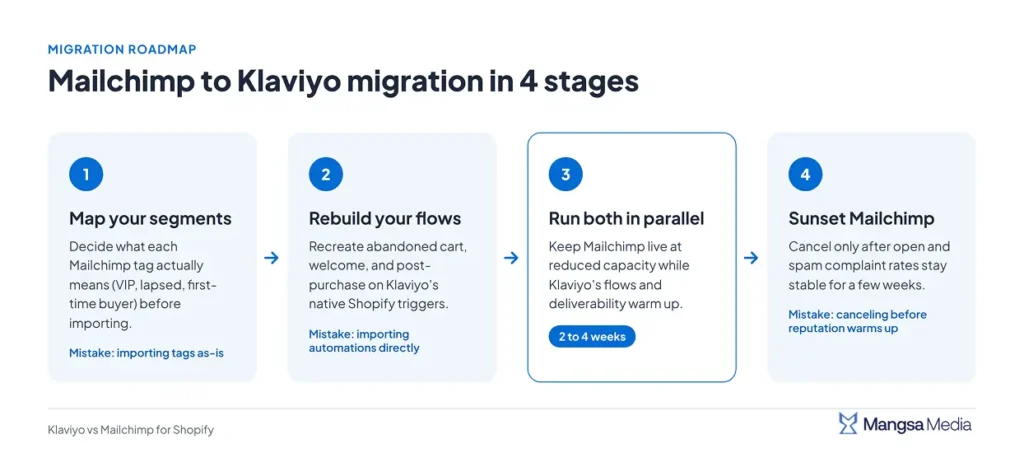
Each stage has one job and one common way to fail, so the steps below take them in order, starting with your segments.
1. Export and Map Your Segments Before You Touch Flows
Mailchimp tags don’t translate directly into Klaviyo’s segment logic, so map what each tag represents, VIP, lapsed, first-time buyer, before importing anything. Importing tags as-is just recreates Mailchimp’s shallow segmentation inside a more powerful tool.
2. Rebuild Flows From Scratch, Don’t Just Import Mailchimp Automations
Klaviyo’s flow logic is built around live Shopify event triggers, Mailchimp’s automations weren’t designed with that depth, so a direct import just recreates a weaker version. Rebuild core flows, abandoned cart, welcome, post-purchase, on Klaviyo’s native triggers instead.
Related reading:The Best 10 Klaviyo Flows for Ecommerce (2026)
3. Run Both Platforms in Parallel for 2 to 4 Weeks
Keep Mailchimp live at reduced capacity while Klaviyo’s flows and deliverability warm up, don’t cut over in one day. This window also catches anything that didn’t migrate cleanly, like unsubscribe status, before it becomes a compliance problem.
4. Sunset Mailchimp Only After Deliverability Stabilizes
A freshly warmed Klaviyo account needs time before inbox providers trust it like they trusted your Mailchimp history. Watch open and spam complaint rates for a few weeks before canceling Mailchimp, not just days.
Related reading: Klaviyo Email Deliverability Best Practices
Run this checklist before you cancel your old platform.
| Stage | What to Check | Common Mistake |
| Segment mapping | Each tag mapped to real segment logic | Importing tags as-is |
| Flow rebuild | Core flows on native Shopify triggers | Importing automations directly |
| Parallel run | Both platforms live for 2-4 weeks | Cutting over in a single day |
| Deliverability | Open and complaint rates stable for weeks | Canceling before reputation warms up |
Where Does This Fit Into a Bigger Retention System?
Migrating platforms fixes the tool, not the strategy, a freshly migrated Klaviyo account with default settings and no real segmentation performs barely better than the Mailchimp setup it replaced.
This is the thinking behind Mangsa Media Custom Klaviyo Architecture, we treat migration as the starting point for building the right flows around your actual customer journey, not the finish line.
Don’t migrate platforms until you know what’s actually broken in your customer journey. A Retention Health Check from Mangsa Media starts there, before a single contact is exported.
Common Questions About Klaviyo vs Mailchimp for Shopify
How long does a Mailchimp to Klaviyo migration take?
Most Shopify stores complete the core migration in 1 to 2 weeks, plus another 2 to 4 weeks running both platforms in parallel before sunsetting Mailchimp.
Will I lose my email history migrating from Mailchimp to Klaviyo?
No, Klaviyo’s Mailchimp integration imports your contact history and custom properties, but automations and templates still need rebuilding natively, not just copying over.
Is Klaviyo worth the higher cost compared to Mailchimp for a small Shopify store?
Only if you’re going to use the deeper segmentation and flow logic it offers. A small store running one basic abandoned cart email doesn’t need that depth yet.
Does Klaviyo’s Shopify integration work differently than Mailchimp’s?
Yes, Klaviyo pulls event-level Shopify data directly into flow triggers and segments, while Mailchimp’s integration covers broader order and customer sync built for general use.
Can I run Klaviyo and Mailchimp on the same Shopify store at once?
Yes, briefly, during migration. Running both long-term causes duplicate sends and confusing reporting, so keep the parallel window to a few weeks.
References
- TechCrunch. (2019). Mailchimp and Shopify break up.
- Shopify App Store. (2026). Klaviyo: Email Marketing & SMS and Mailchimp Email SMS Marketing app listings.
- Klaviyo. (n.d.). SMS marketing.
- Mailchimp. (n.d.). About SMS Marketing.
- Scandiweb. (2024). Email marketing revenue increased by 4.8x after Klaviyo migration.
- Mailchimp. (n.d.). How Kaylin + Kaylin Pickles increased engagement by switching to Mailchimp.
- Mailchimp. (2026). Pricing.
Rafi Helmi (Rahel) Rabani is an SEO & Content Strategist with experience in B2B technology. He focuses on technical SEO, content strategy, AI Search, and E-E-A-T-driven content. His approach combines data, search intent, and AI-assisted workflows to build scalable organic growth and meaningful content experiences.
Keep reading
Cut Your Klaviyo Bill Without Breaking Your Flows: A Profile Billing Suppression Playbook
Your Klaviyo bill went up again, and your list didn’t grow that much. That’s the klaviyo profile billing suppression problem
Klaviyo Flows vs Campaigns: Finding the Revenue Split That Actually Fits Your Brand
Everyone tells you flows are where the real money is, set them up once and let them run forever. That
The Klaviyo Welcome Flow Discount Strategy That Doesn’t Wreck Your Margins
A 20% welcome discount feels like the safe, default choice, and that’s exactly the problem. Half the DTC brands running