
Blog/Email Marketing
Cut Your Klaviyo Bill Without Breaking Your Flows: A Profile Billing Suppression Playbook
 By Rafi Helmi (Rahel) Rabani13 October 20266 min read
Your Klaviyo bill went up again, and your list didn’t grow that much. That’s the klaviyo profile billing suppression problem nobody explains clearly, you’re paying full price for profiles that will never open another email, place another order, or do anything except sit on your bill.
Most founders either ignore it and keep overpaying, or suppress everything in sight and accidentally silence a flow that was still making them money.
Fixing this takes more than clicking “suppress” on your least-active segment. It takes knowing exactly which profiles are dead weight versus which ones just stopped opening email while they kept shopping somewhere else on your site.
How Does Klaviyo Profile Billing Suppression Actually Lower Your Bill?
It drops you out of the billable profile count. Klaviyo’s Profile and Email plans charge based on billable profiles, meaning active profiles with a valid email or phone number that aren’t suppressed or deleted [1].
Once a profile is suppressed and that suppression finishes processing, it stops counting toward your plan tier. It still sits in your account for historical reporting, so you’re not losing data, you’re just no longer paying to keep that dead weight marketable [1].
This is the mechanic behind klaviyo pricing tiers that most founders never look at closely. You’re not charged for your list size, you’re charged for how many profiles Klaviyo is still allowed to message.
Why Do Suppressed Profiles Stop Your Flows From Firing?
Because suppression makes a profile ineligible for marketing entirely, not just email sends. Klaviyo’s own community support confirms that suppressed profiles can’t trigger flows, including behavior-based ones like abandoned cart, browse abandonment, and post-purchase [2].
If a suppressed contact starts a checkout or places an order, Klaviyo skips them for that flow. That’s the mechanism behind the trap in klaviyo contact billing cleanup, cutting your bill can quietly cut your recovered revenue too, if you suppress the wrong profiles.
Related reading: Klaviyo Sunset Flow Strategy Most Brands Get Wrong
What’s the Difference Between a Ghost Profile and a Suppressed Profile?
A ghost profile is one still sitting on your bill even though it’s never going to buy again, suppressed or not. A suppressed profile is one Klaviyo has already excluded from billing and marketing.
The dangerous middle ground is the profile that looks dead by email standards but isn’t dead by behavior. Someone who hasn’t opened a campaign in 200 days but just browsed three product pages last week is still shopping, they’re just ignoring your subject lines. Suppress that profile on open-rate logic alone and you’ll never know they almost bought.
Never-subscribed profiles complicate this further. They still count toward billing and can still receive transactional flows regardless of marketing consent, so they behave differently from a profile you’ve actually suppressed. Here’s how all three statuses stack up side by side.
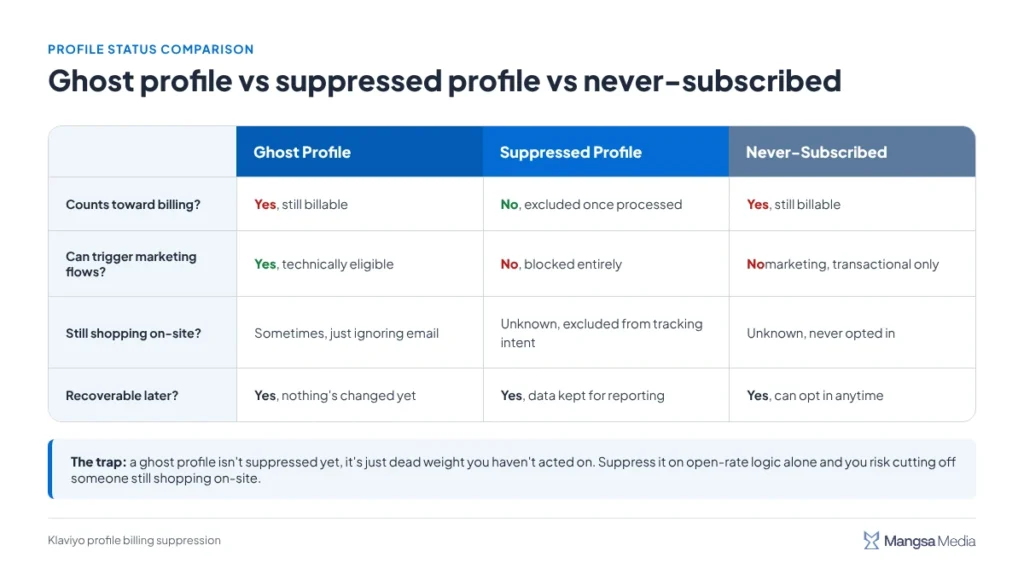
Once you can tell these three apart, building a segment that only catches the real ghosts gets a lot more straightforward.
How Do You Build a Ghost Profile Suppression Segment That Doesn’t Break Your Flows?
You filter on inactivity plus zero recent behavior, never on inactivity alone. Here’s the sequence that keeps revenue-generating profiles out of the suppression pile.
1. Set a Longer Inactivity Window Than You Think You Need
Don’t suppress on 60 or 90 days of no opens. Go further out, 180 to 365 days depending on your purchase cycle, so you’re not catching customers who buy seasonally and just haven’t needed you lately.
Also require a minimum number of emails received, not just days elapsed. A profile that joined your list three weeks ago and got two campaigns hasn’t had a real chance to engage yet, that’s a new subscriber, not a ghost.
2. Exclude Anyone With Recent Site or Purchase Activity
Layer in a second condition: no site visit, no added-to-cart event, and no order in the same window. A profile that’s quiet on email but active on-site isn’t a ghost, it’s a flow candidate waiting for the right trigger.
3. Pull Anyone Currently Inside an Active Flow
Check your flow filters before you run the suppression segment. Suppressing someone mid-sequence doesn’t just stop future sends, it can orphan them out of a flow they were already partway through.
4. Review the List Before You Bulk-Suppress
Export the segment and sanity-check it against your highest-LTV customers first. One VIP buyer with a quiet inbox but a full cart history is worth more than the profiles you’re trying to clear out.
5. Suppress Through the Segment Menu, Not One Profile at a Time
Go to Lists & Segments, open the action menu next to your suppression segment, and select “Suppress current members” [3]. If Klaviyo detects recently active profiles in that segment, it stops you with a choice, “Suppress only inactive profiles” or “Suppress everyone” [3].
Take the inactive-only option every time, that’s Klaviyo itself protecting you from the exact mistake this playbook is built to avoid.
Related reading: Klaviyo Email Deliverability Best Practices
Why Doesn’t Your Bill Drop Right After You Suppress Profiles?
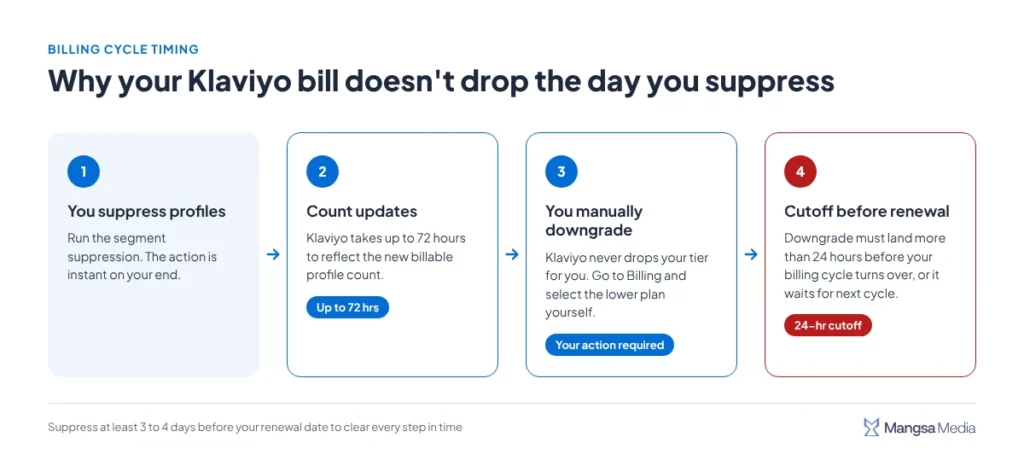
Because suppression and plan downgrades are two separate steps, and Klaviyo doesn’t do the second one for you. Your plan doesn’t automatically move down a tier when your billable count drops, you have to go into billing and select the lower tier yourself [4].
There’s also a processing lag to plan around. After suppressing or deleting profiles, the count can take up to 72 hours to update, and any downgrade has to happen more than 24 hours before your billing cycle turns over or it won’t apply until the next one [4]. Suppress the week before your renewal date, not the day of.
Here’s what that sequence actually looks like from the moment you suppress to the moment your bill reflects it.
Also run through this before you touch the suppress button.
| Step | What to Check | Why It Matters |
| Inactivity window | 180+ days, not 60-90 | Avoids catching seasonal buyers |
| Behavior filter | No site visits, carts, or orders in that window | Separates true ghosts from quiet shoppers |
| Active flows | No one mid-sequence | Prevents orphaned flow sends |
| Timing | Suppress 3+ days before renewal | Gives the 72-hour count update room to land |
| Plan tier | Manually downgrade after suppression | The bill doesn’t drop on its own |
What Happens to Your LTV Math If You Skip This?
Your ecommerce LTV optimization numbers get quietly wrong in both directions. You overpay Klaviyo for profiles that will never contribute lifetime value, and if you suppress carelessly, you undercount the customers who still will.
A profile suppression playbook isn’t a one-time cleanup, it’s a recurring check tied to your billing cycle. The brands that stay lean on their Klaviyo bill treat this the same way they treat ad budget, reviewed on a schedule, not fixed once and forgotten.
Don’t fix your email flows until you know what’s actually broken in your customer journey. A diagnostic health check from Mangsa Media looks at your actual profile and flow setup before anyone touches a suppression segment.
Common Questions About Klaviyo Profile Billing Suppression
Does suppressing a profile in Klaviyo delete it?
No, suppression keeps the profile in your account for reporting, it just removes them from billing and marketing eligibility.
How long does it take for Klaviyo to update my bill after suppression?
Up to 72 hours for the profile count to update, and your plan still needs a manual downgrade after that.
Will suppressed profiles still receive abandoned cart emails?
No, suppressed profiles are skipped from flow triggers entirely, including cart, browse, and post-purchase flows.
What’s the safest inactivity window before suppressing a profile?
180 to 365 days with zero site or purchase activity, not just zero email opens, to avoid cutting off seasonal buyers.
Do never-subscribed profiles count toward my Klaviyo bill?
Yes, they still count as billable and can receive transactional flows, since they’re a different category from suppressed profiles.
References
- Klaviyo. (n.d.). How Klaviyo Bills Customers for Emails.
- Klaviyo Community. (n.d.). Will suppressed profiles still trigger flows under Klaviyo’s new pricing model?
- Klaviyo. (n.d.). How to Bulk Delete or Suppress Contacts in Klaviyo.
- Klaviyo. (n.d.). FAQ: How much do SMS and MMS messages cost?
Rafi Helmi (Rahel) Rabani is an SEO & Content Strategist with experience in B2B technology. He focuses on technical SEO, content strategy, AI Search, and E-E-A-T-driven content. His approach combines data, search intent, and AI-assisted workflows to build scalable organic growth and meaningful content experiences.
Keep reading
Klaviyo vs Mailchimp for Shopify: Why Serious DTC Brands Migrate
Mailchimp works fine until your Shopify store crosses a certain revenue point, then it quietly becomes the thing holding your
Klaviyo Flows vs Campaigns: Finding the Revenue Split That Actually Fits Your Brand
Everyone tells you flows are where the real money is, set them up once and let them run forever. That
The Klaviyo Welcome Flow Discount Strategy That Doesn’t Wreck Your Margins
A 20% welcome discount feels like the safe, default choice, and that’s exactly the problem. Half the DTC brands running